
In 2025, content creation has become faster, smarter, and more accessible thanks to artificial intelligence. One of the standout tools driving this change is Pippit AI—Powered by CapCut. Built to simplify video editing, design, and social media content creation, Pippit AI combines CapCut’s professional-grade engine with automation and creativity powered by AI. In this review, we’ll explore its features, pricing, benefits, drawbacks, and how it compares to similar tools in the market.
What is Pippit AI?
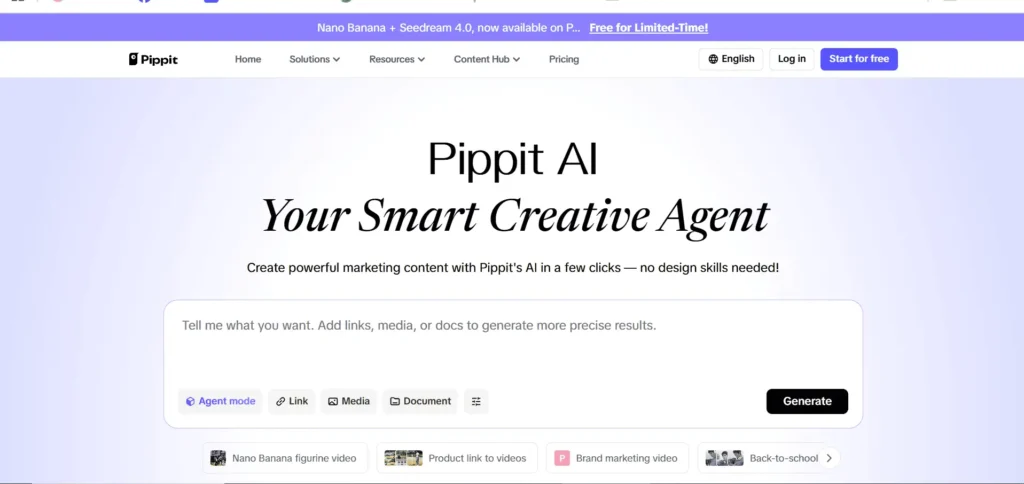
Pippit AI is an AI-powered creative tool developed in partnership with CapCut, designed to help creators, marketers, and business owners produce stunning videos, posters, and promotional content quickly. It integrates CapCut’s design and video editing technology with AI features like image generation, smart templates, and content automation.
Whether you’re a social media influencer, digital marketer, or small business owner, Pippit AI helps you create videos and marketing visuals within minutes—no design experience required.
Features
Pippit AI offers a wide range of intelligent tools and templates that streamline every stage of content creation. Key features include:
- AI-Generated Templates: Ready-made templates for TikTok, YouTube Shorts, Instagram Reels, and e-commerce ads.
- Smart Video Editing: Automatic video trimming, caption generation, and music synchronization powered by CapCut’s engine.
- AI Image & Poster Generator: Instantly turn text or product links into creative posters for marketing.
- Voiceover & Subtitle Tools: Generate natural-sounding voiceovers and multilingual subtitles automatically.
- Social Media Integration: Publish content directly to platforms like TikTok, YouTube, and Instagram.
- Affiliate Dashboard: Integrated affiliate tools let users promote Pippit AI and earn recurring commissions.
These features make Pippit AI one of the most versatile all-in-one creative tools available in 2025.
Pros & Cons: Pippit AI & CapCut AI
| Pros | Cons |
|---|---|
| User-friendly interface and beginner-friendly tools | Limited customization for advanced users |
| Seamless integration with CapCut for fast video creation | Requires a stable internet connection |
| High affiliate commission rates and easy payouts | Some premium templates and features are locked behind paywalls. |
| Rapid AI generation of marketing assets | Occasional delays during heavy template rendering |
| Access to hundreds of templates for social media & marketing content | Certain advanced analytics are available only in Pro plans. |
| Multi-platform publishing and scheduling | Free plan has limited features. |
Overall, the advantages far outweigh the drawbacks, especially for users who value speed and creativity.
Personal Experience
After testing Pippit AI for two weeks, I found it impressively efficient for social media content. I used it to create multiple TikTok and Instagram videos using pre-made templates. The AI automatically generated captions and matched background music perfectly.
Compared to using CapCut alone, Pippit’s AI tools cut my editing time in half. I also tried its poster generator, which quickly transformed product images into professional-looking ads. The platform felt intuitive and required almost no editing experience.
However, during peak hours, some templates took a few extra seconds to load—a minor inconvenience in an otherwise smooth experience.
Pricing
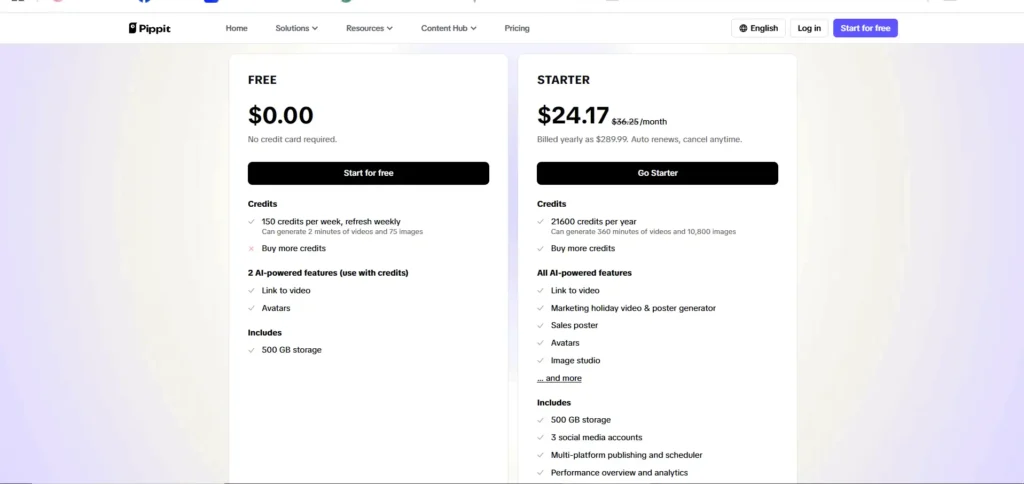
Pippit AI offers a subscription-based pricing model with the following options:
| Plan/Brand | Monthly Price | Annual Price | Features |
|---|---|---|---|
| Pippit AI Free | Free | Free | 400 credits, create up to 400 videos or 200 images, basic AI features |
| Pippit AI Starter | $34.75 | $289.99 | 21,600 credits/year, 360 min video or 10,800 images, 500GB storage, 3 social accounts, multi-platform publishing, performance analytics |
| Pippit AI Pro | $24.17 | $289.99 | All AI-powered features, marketing holiday videos & posters, avatars, image studio, 500GB storage, 3 social accounts, multi-platform publishing, performance analytics |
| CapCut Free | Free | Free | Basic editing tools, limited access to AI features |
| CapCut Standard | $9.99 | – | Removes watermarks and additional effects |
| CapCut Pro | $7.99 | $74.99 | 4K export, full asset library, advanced AI tools |
Alternatives
While Pippit AI is one of the strongest contenders in AI-powered design, several alternatives compete in this space:
- Canva Magic Studio—Offers AI design generation and video editing with broader branding tools.
- InVideo AI—Focuses on transforming scripts into videos with advanced automation.
- Runway ML—aimed at professionals needing AI-powered video editing and effects.
- —CombinesDescript—Combines transcription, podcast editing, and video editing in one platform.
Each alternative has unique strengths, but Pippit AI’s integration with CapCut and its affordability make it stand out.
Integration & Compatibility
Pippit AI integrates smoothly with CapCut, TikTok, and other ByteDance ecosystem platforms. It works directly from your browser—no installation required—and syncs projects across devices. The platform supports Chrome, Safari, Edge, and mobile browsers, making it accessible to a global audience.
It also allows direct publishing to TikTok and YouTube, making it ideal for creators focused on short-form content.
FAQ: Pippit AI & CapCut AI
Is Pippit part of CapCut?
Yes. Pippit AI is powered by CapCut’s technology. It’s part of a creative ecosystem that combines AI design, video automation, and affiliate marketing tools to simplify digital content creation.
Is AI in CapCut free?
CapCut offers free AI tools, such as auto-captioning and AI effects. However, premium AI features—like advanced video templates and high-resolution exports—are included in the paid CapCut Pro plan.
Is CapCut AI video generator good?
Yes. CapCut’s AI video generator produces high-quality, engaging videos using text prompts or templates. It’s especially useful for social media creators and marketers.
Can I use AI to edit videos?
Absolutely. CapCut AI enables automated video editing with smart effects, scene transitions, and background music syncing—making it perfect for users without editing experience.
Who made CapCut banned?
CapCut faced temporary restrictions in some regions due to its link with ByteDance (TikTok’s parent company), but it remains widely available globally as of 2025.
How does Pippit work?
Pippit AI uses artificial intelligence to generate marketing visuals and videos from text prompts. Users can customize results, promote the platform, and earn affiliate income from referrals.
Is there a free AI video generator like CapCut?
Yes. Alternatives include Lumen5, FlexClip, and Runway ML, which offer limited free AI video generation tools similar to CapCut.
What is Pippit vs CapCut?
Pippit AI focuses on AI-driven marketing visuals and affiliate income, while CapCut is a full-scale video editing suite. Pippit integrates CapCut’s tools for easier content creation.
What is the difference between CapCut and CapCut Pro?
CapCut is free, offering basic editing and AI tools. CapCut Pro adds premium templates, higher export quality, and priority support for professionals.
What app is equal to CapCut?
Canva Video, InVideo, and Adobe Express are comparable apps that provide editing and AI creation features.
Is CapCut Business free?
CapCut Business offers free sign-up, but advanced branding tools and analytics are part of premium packages.
Is CapCut safe?
Yes. CapCut follows strict data security practices under ByteDance’s global compliance framework.
Was CapCut removed?
No. CapCut remains active and widely available through app stores as of 2025.
Is CapCut under TikTok?
Yes. CapCut is owned by ByteDance, the same parent company behind TikTok.
Who controls CapCut?
ByteDance controls and manages CapCut’s operations and data infrastructure.
What is the real name of CapCut?
CapCut was initially launched as Viamaker before being rebranded by ByteDance in 2020.
Does CapCut cut videos?
Yes, it allows users to trim, split, and rearrange video clips easily.
Is CapCut Photoshop?
No. CapCut is a video editing tool, while Photoshop focuses on photo editing and design.
How much does CapCut Business cost?
CapCut Business pricing varies but typically starts around $10–$30 per month for premium analytics and brand management tools.
What type of app is CapCut?
CapCut is a video editing and AI content creation app for both casual and professional users.
What is the difference between CapCut Pro and free?
The Pro version includes higher-quality exports, extra templates, and exclusive effects unavailable in the free plan.
Which companies use CapCut?
Many influencers, small businesses, and content creators use CapCut for social media marketing and advertising.
Conclusion
Pippit AI—powered by CapCut is more than just another video editing app—it’s a smart creative assistant built for the modern content era. Its combination of AI automation, sleek templates, and affiliate earning opportunities makes it perfect for freelancers, marketers, and small businesses.
If you want to create professional, engaging videos and visuals without the complexity of traditional tools, Pippit AI is absolutely worth trying in 2025.
Final Verdict: Pippit AI and CapCut AI together form an exceptional, powerful, and profitable combination for creators ready to level up their content strategy in 2025.


