
CapCut Review 2026
CapCut continues to dominate the short-form video editing space in 2026, especially among content creators, marketers, and small businesses. With powerful AI tools, cloud-based workflows, and a beginner-friendly interface, CapCut bridges the gap between simple mobile editors and professional video software. This review explores CapCut in detail, covering features, pricing, real-world usage, and whether it’s still worth using this year.
What is CapCut?
CapCut is a multi-platform video editing application developed by ByteDance, the company behind TikTok. It allows users to create, edit, and export videos on mobile devices, desktop computers, and web browsers. CapCut is designed primarily for social media content, making it easy to produce TikTok videos, Instagram Reels, YouTube Shorts, and promotional marketing videos without advanced editing skills.
Unlike traditional video editors, CapCut focuses on speed, automation, and templates. Its AI-powered tools handle tasks like subtitle generation, background removal, and video enhancement, allowing creators to produce professional-looking content in minutes rather than hours.
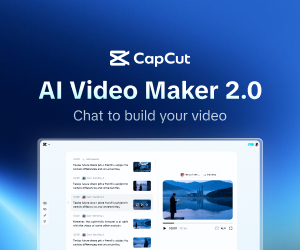
Features
CapCut offers an impressive feature set in 2026 that caters to both beginners and intermediate creators. The timeline-based editor supports multi-layer video and audio tracks, making it easy to add music, voiceovers, text, and effects. Users can access a large library of transitions, filters, stickers, and animated text styles designed for modern social media trends.
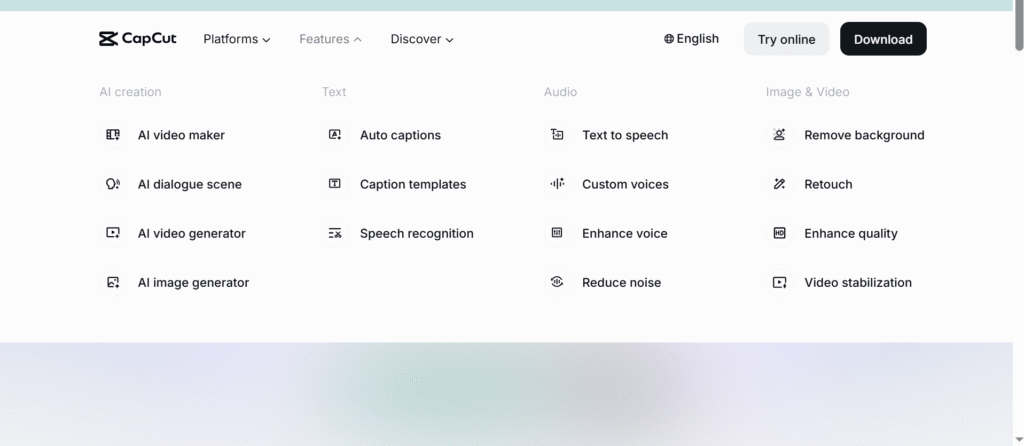
One of CapCut’s strongest advantages is its AI functionality. Automatic captions support multiple languages and dialects, while smart cut tools detect pauses and remove unnecessary clips. Background removal works without green screens, and AI audio tools reduce noise and enhance voice clarity. Cloud syncing allows projects to be saved and continued across devices, which is especially useful for creators working on both mobile and desktop.
Pros & Cons
CapCut’s biggest strengths include its ease of use, fast editing workflow, and powerful AI tools. It’s accessible to beginners but still flexible enough for more advanced edits. The large template library saves time, and built-in social media export options make publishing effortless.
However, CapCut also has downsides. Many advanced features are now locked behind a paid subscription, which can be frustrating for long-time free users. Performance issues may appear on older devices or with large projects. Additionally, professional editors may find CapCut limiting compared to software like Adobe Premiere Pro or DaVinci Resolve, particularly for advanced color grading and complex timelines.
Personal Experience
Using CapCut in 2026 feels efficient and modern, especially for short-form content creation. The interface is clean and intuitive, making it easy to jump into editing without tutorials. AI captions significantly reduce editing time, and templates are helpful for creating trendy videos quickly.
That said, frequent updates sometimes move tools or lock features behind paid plans, which can disrupt workflows. Despite this, CapCut remains reliable for daily content creation and is especially useful for creators who prioritize speed over deep technical control.
Pricing
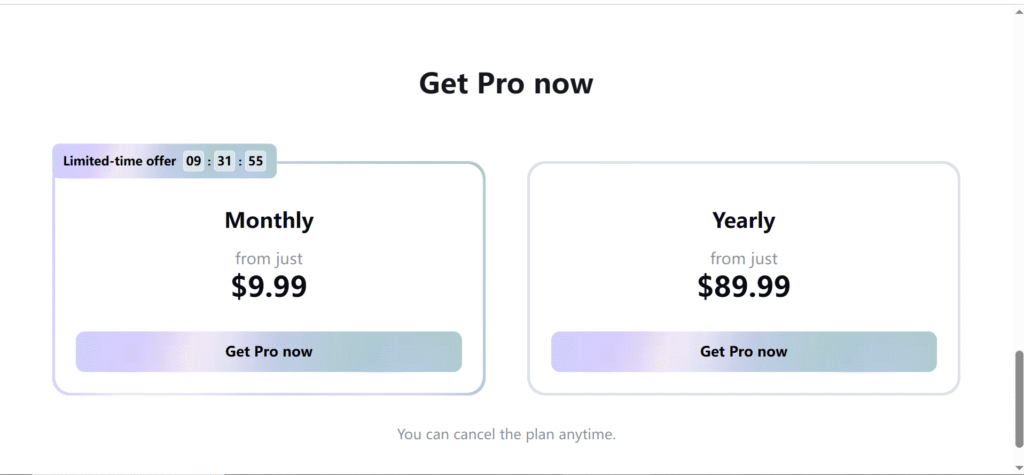
CapCut operates on a freemium model. The free version includes essential editing tools, basic templates, and standard export options. CapCut Pro unlocks premium effects, higher-resolution exports (including 4K), advanced AI tools, and additional music and asset libraries through a monthly or annual subscription.
In some regions, CapCut also offers higher-tier plans with expanded cloud storage and increased AI usage. Pricing varies depending on location and platform, making it accessible to both casual users and professionals.
Alternatives
Several video editors serve as strong alternatives to CapCut in 2026. DaVinci Resolve is ideal for professional editors who need advanced color grading and full creative control. Adobe Premiere Pro offers industry-standard editing features and deep integration with other Adobe tools. VN Video Editor and InShot provide lightweight mobile editing experiences, while Final Cut Pro is a powerful option for macOS users seeking professional performance.
Each alternative excels in different areas, but CapCut remains one of the best options for fast, social-media-focused editing.
Is CapCut Worth Using in 2026?
CapCut is still one of the best video editing tools in 2026 for creators focused on short-form and social media content. Its AI tools, cross-platform support, and simple interface make it highly efficient for modern content creation. While increasing monetization and feature restrictions may deter some users, CapCut continues to offer strong value for beginners, influencers, and small businesses looking to produce high-quality videos quickly.
Read more
Pippit AI Review 2025—The Ultimate Game-Changer for Smart Creators
FAQ
How to use the CapCut free download?
To download CapCut for free, simply go to the official CapCut website or search for “CapCut” in the Google Play Store (Android) or Apple App Store (iOS). You can also download the desktop app from the official site for free—just click “Download” and install it on your PC or Mac. (CaCut)
Which CapCut is free?
CapCut offers a free version on mobile (iOS & Android), PC/Mac, and web. The free version includes core editing tools, templates, and export functions. Some advanced features (premium effects, cloud storage, higher export quality) may require a Pro subscription, but the basic editor is free to use. (CapCut)
How to create an account in CapCut?
To create a CapCut account:
- Install the app or open CapCut Web.
- Tap “Sign Up” or “Log In.”
- Choose a method like Google, TikTok, Facebook, or email and follow the steps.
- Once registered, you can use the same login on mobile, PC, or web. (CapCut)
How much is CapCut mobile?
CapCut’s base app is free, but premium plans cost money. Typical pricing (subject to change) includes a Standard mobile plan and a Pro plan with more features. For example, mobile subscriptions can start at around $5.99/month with higher tiers costing more. (Video Wizard Tools)
How long can I use CapCut for free?
CapCut’s free version can be used indefinitely—there’s no automatic expiration on basic editing features. Some users report occasional prompts for subscriptions, but you can continue editing and exporting with free tools. (CapCut)
How to start CapCut?
Once CapCut is installed:
- Open the CapCut app or web editor.
- Tap “New Project.”
- Select videos or photos you want to edit.
- The editor opens with a timeline — now you can trim, add music, text, effects, etc.
How to use CapCut on mobile?
On mobile:
- Download CapCut from the App Store or Google Play.
- Open it and grant any permissions (camera, photos).
- Tap “New Project,” choose clips, and use the toolbar to edit.
- Add transitions, text, filters, and music with simple taps—then export when finished. (Squarespace)
Can we use CapCut without downloading?
—CapCutYes — CapCut has a web version that runs in your browser, so you can edit videos without installing the app. Just open the CapCut website and start a project online. (CapCut)
How to use VPN for CapCut?
If CapCut isn’t available in your region or app store, you can use a VPN to connect to a country where it is available (like Canada, the UK, or Japan). Change your device’s region settings, turn on a VPN, then download and access the app. Once it’s installed, CapCut usually works even without the VPN. (VPNpro)
Can I make videos on CapCut for free?
Yes—you can create, edit, and export videos for free using CapCut’s core tools. You don’t have to pay to make videos, though some advanced or premium resources may require a subscription. (CapCut)