
Kittl design has become one of the most talked-about graphic design tools of 2025—an online platform that blends simplicity, power, and creativity. Whether you’re a small business owner, content creator, or professional designer, Kittl offers everything you need to create high-quality visuals directly in your browser.
In this review, we explore what makes Kittl design unique, its top features, pros and cons, pricing, and whether it’s truly worth your time and money.
What is Kittl?
Kittl is a browser-based graphic design platform that allows users to create stunning designs with ease. It was founded in Berlin, Germany, and evolved from a typography-focused startup called Heritage Type.
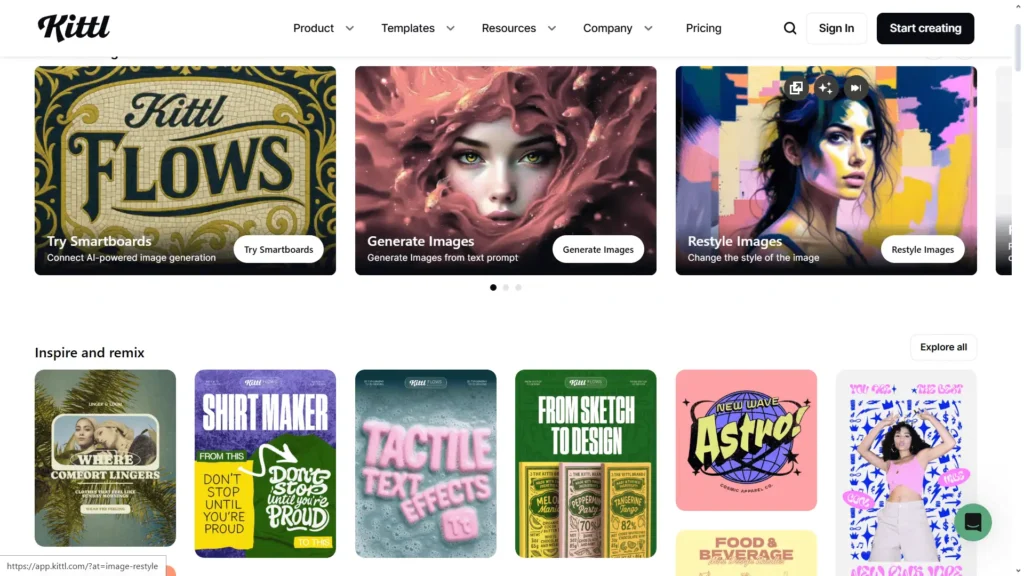
Today, Kittl design is used by millions of creators worldwide for making logos, social media graphics, posters, apparel prints, and much more. With thousands of templates, an AI-powered design engine, and an extensive font library, Kittl combines professional power with accessibility.
Features
The Kittl design platform includes everything you need to create professional-grade visuals without the need to install heavy software. Some of its standout features include
- Browser-Based Editor: No installation needed — design anytime, anywhere.
- AI Tools: Generate images, remove or replace backgrounds, and upscale visuals using artificial intelligence.
- Typography Library: Over 1,400 professional fonts, including classics from Monotype such as Helvetica and Futura.
- Template Library: Pre-built templates for branding, t-shirt printing, marketing, and social media.
- Collaboration Tools: Real-time editing, commenting, and project sharing with teammates.
- Mockups: Instantly view your designs on shirts, mugs, posters, or packaging.
- Infinite Canvas: Perfect for large or complex creative projects.
Pros & Cons of Kittl Design
| Pros ✅ | Cons ❌ |
|---|---|
| Fewer integrations with third-party apps | Web-based only—requires an internet connection |
| High-quality templates for T-shirts, posters, and branding | Limited customization in the free plan |
| AI-powered features like text-to-image and background remover | Some templates may be overused by multiple creators |
| Commercial license options for selling your work | No advanced offline editing tools |
| Affordable pricing compared to Adobe and other tools | Fewer integrations with third-party app |
Personal Experience
From my personal experience, Kittl design stands out for its ease of use and artistic freedom. The interface feels sleek and beginner-friendly, yet the controls are precise enough for professional use.
I particularly enjoy the text and logo creation process—Kittl’s typography tools outperform Canva in quality and customizability: the AI background remover and mockup previews save hours of work. For most of my design needs, Kittl has replaced both Illustrator and Canva in daily use.
Pricing
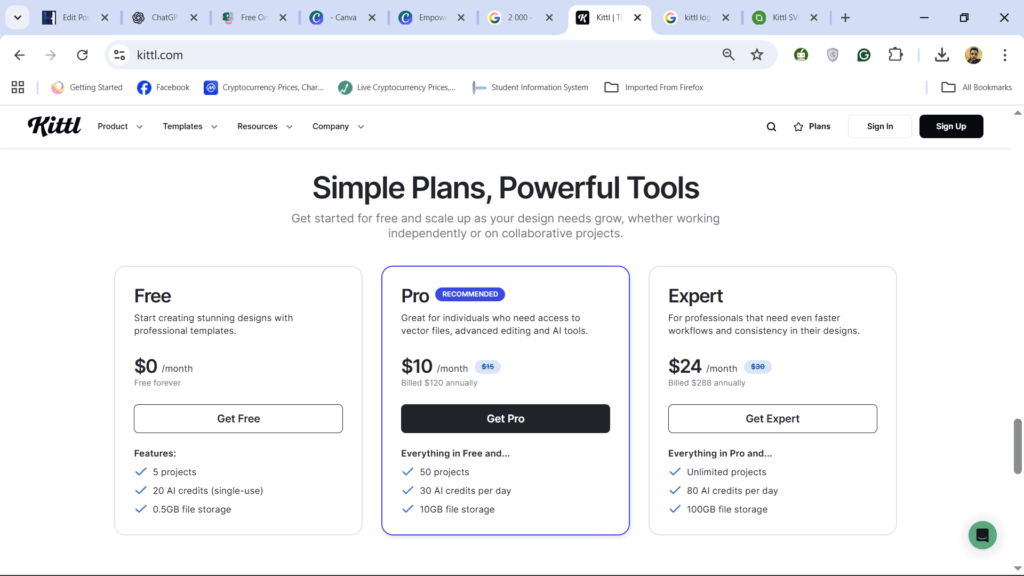
Kittl offers flexible pricing plans based on user needs:
| Plan | Price (Monthly) | Best For | Key Features |
|---|---|---|---|
| Free | $0 | Hobbyists | Limited templates, basic exports |
| Pro | $10 | Freelancers & Etsy sellers | Commercial use, premium templates, vector export |
| Expert | $24 | Agencies & teams | Extended license, AI tools, collaboration options |
Kittl also provides discounts on annual billing and special offers for students and educators.
Alternatives
If Kittl’s design doesn’t fully match your workflow, you can explore these alternatives:
- Canva: Excellent for social media graphics and short videos.
- Adobe Express: Integrates with other Adobe software.
- Fotor: Great for AI-based photo edits and filters.
- VistaCreate: Marketing-focused templates for brands.
- Figma: Better suited for interface (UI/UX) design and collaboration.
Who Should Use Kittl Design
Kittl is perfect for:
- Freelancers designing logos, shirts, or digital products.
- Print-on-demand sellers who need fast, beautiful designs.
- Small businesses are building their branding materials.
- Social media creators are looking for standout visuals.
—but if you work mostly with animations or videos, Kittl design may not be your first choice—but for static graphics, it’s one of the best tools available.
Final Verdict
—It’s the Kittl Review 2025 Verdict:
Kittl design is more than just another Canva alternative—it’s a designer-first creative hub combining the power of AI, typography mastery, and collaboration.
If you value elegant visuals, easy workflows, and cost-effective plans, Kittl is absolutely worth trying in 2025. It’s ideal for creators who want beautiful results without technical complexity.
Copyright & Commercial Use FAQs
1. Are Kittl designs copyrighted?
Yes. Designs and templates on Kittl are protected by copyright, but when you create your own designs using Kittl’s elements under a commercial license, you own the rights to your unique creation.
2. Can you sell Kittl designs?
Yes, you can sell designs made in Kittl if you have a commercial license, typically available in the Pro Plan or higher.
3. Can you sell Kittl designs on Etsy?
Absolutely! Many creators use Kittl for Etsy print-on-demand stores. As long as you use Kittl’s commercial plan and create original compositions, you’re allowed to sell them.
4. Can you use Kittl designs for commercial use?
Yes. Kittl designs can be used for commercial purposes, including marketing, branding, or product sales, as long as you follow Kittl’s licensing terms.
5. Can I sell Kittl designs on Etsy?
Yes, but make sure your designs are customized and original. Avoid directly reselling templates from Kittl without modification, as this may violate their license agreement.
Other Relevant Information
Kittl is continuously improving with AI-driven features, better collaboration tools, and growing community support. It’s especially popular among Etsy sellers, T-shirt designers, and brand creators who want to make professional designs without expensive software.
For 2025, Kittl design continues to dominate the market for easy, fast, and aesthetic graphic design creation.
How Kittl Compares to Canva
While both Kittl and Canva are excellent design platforms, they serve slightly different audiences. Canva focuses on quick, modern layouts for social media and branding, while Kittl Design caters to creative professionals seeking artistic and vintage-style graphics.
| Feature | Kittl | Canva |
|---|---|---|
| Typography | Advanced, vintage styles | Basic |
| AI Tools | Yes | Yes |
| Licensing | Strong commercial use support | Varies |
| Templates | Focused on print and merch | Focused on digital and social media |
| Target Users | Designers, Etsy sellers, small businesses | General marketers, educators |
Tips for Getting the Most Out of Kittl Design
- Use AI tools for fast creativity.
- Join the Kittl Community to share and discover designs.
- Upgrade to Pro for access to commercial licenses.
- Create custom brand kits to save your favorite fonts and colors.
- Experiment with typography layers to make vintage effects pop.
Why Choose Kittl in 2025
As AI continues transforming design tools, Kittl stands out as a hybrid platform—easy for beginners, but powerful enough for professionals.
Its focus on high-quality typography, community creativity, and AI-powered innovation makes it one of the most promising tools for creators in 2025.
Conclusion
Kittl is an excellent choice for anyone seeking a powerful yet beginner-friendly design platform. Its AI tools, vintage-style fonts, and commercial licensing options make it one of the top choices for creators in 2025.
Whether you’re designing for fun, your business, or for sale on Etsy, Kittl design has everything you need to create stunning results.


One Comment on “Kittl Review 2025: The Powerful Design Tool Revolutionizing Creative Workflows”